
Three small tools for planning a Lolobuy order
A line finder, a fit gap calculator and a return and storage clock. All three do their arithmetic on your own device; nothing you type leaves the page.
This page explains how to use the tools and what each one is based on. They exist because the slips are full of numbers that only mean something next to your own: your country, your parcel weight, your measurements, your dates. Each tool states its source and date, so you know when a figure may be stale.
Line finder: every quote from our estimator pull
The line finder is a shipping calculator built from a fixed snapshot. Choose a destination and a parcel weight, press Show lines, and it lists every line Lolobuy's estimator quoted on October 22, 2026, cheapest first, with the list price, the price after the automatic coupon, the delivery window and the weight band.
For a useful comparison, keep destination and sample weight fixed while reading the returned lines. Before choosing the lowest price, check your item category, box dimensions and required services in the official estimator. A perfume bottle and a cotton shirt at the same weight may have different eligible routes; the snapshot here has no category or box size applied. The shipping guide explains those restrictions.
Use it to compare, not to pay. Prices change, and categories such as liquids or batteries remove lines, so run the official estimator with your real weight, categories and box size before you submit a parcel.

Fit gap calculator
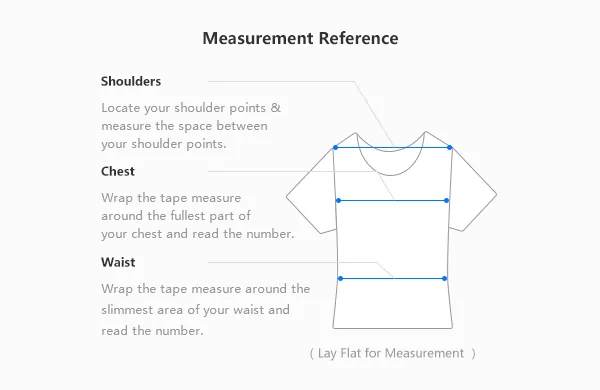
The fit gap calculator compares one measurement of a garment you own with the same measurement on a seller's chart. Measure your garment laid flat, find the same figure on the listing (chest width, waist, length), enter both in centimetres or inches, and press Compare.
For example, compare a 54 cm flat chest width on your own sweatshirt with a 56 cm flat chest width on the listing: the gap is 2 cm in width, not 2 cm around the body. Repeat with garment length and sleeve length before deciding. See the measurement guide; do not compare a body circumference with a flat garment width.
It reads gaps the way Lolobuy's size guide suggests: up to 1 cm is a very small measurement difference, 1 to 3 cm is inside normal hand-measuring error, and more than 3 cm means a different size. Repeat it for two or three measurements; one matching figure does not make a fit.
Return and storage clock
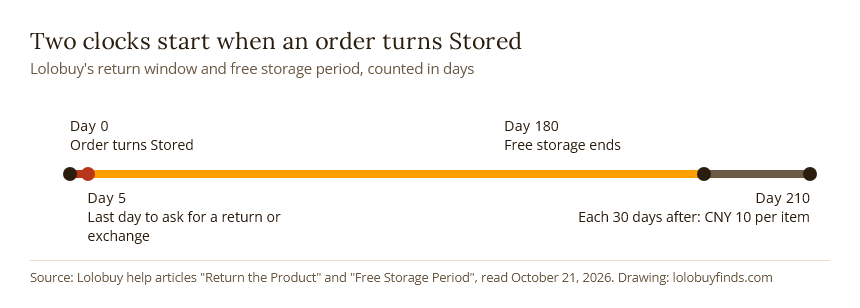
The clock takes the date an order turned Stored in your Lolobuy warehouse. It gives the last day to request a return or exchange (5 days later) and the last day of free storage (180 days later). Add the number of pieces and a planned shipping date, and it works out any storage fee at CNY 10 per piece for each 30 days past day 180.
Dates are counted in whole days. Lolobuy's storage rules also say that goods with no parcel submitted after 180 days can be treated as abandoned, so the clock is a reminder as much as a fee calculator.
Searching the catalogue from this site
The search box on the home page searches the whole catalogue, not only our slips. Plain nouns and materials work best. Seller titles are often abbreviations or deliberate misspellings, so "suede high-top" finds more than a model name would.
If you have a photo but no link, Lolobuy's own picture search is the better tool: it is in the Lolobuy search bar, marked with a picture icon. For an item link you already have, paste it straight into Lolobuy.
Try "rib bralette" or "straw tote" to see the difference a material word makes.