
Ordering a find through Lolobuy, step by step: account, link, payment, photos, parcel, postage, delivery
Seven steps, each with Lolobuy's own screen or illustration, and the slip details that matter at that step.
This is how to use Lolobuy and the Lolobuy Spreadsheet together: find a listing on a shelf or slip, paste its link into Lolobuy, pay, let the warehouse inspect it, then ship it with whatever else you have bought. The order of steps follows Lolobuy's own "How to purchase on LoloBuy?" help article; the figures come from its other help pages and from the estimator we ran on October 22, 2026.
Lolobuy published a one-minute version of this walkthrough on its YouTube channel. It sits beside this text and plays only after you press it.
Screens behind the login, such as the order confirmation and the warehouse list, are described in words; we did not create an account to photograph them.
Create the account from the pop-up form
Lolobuy has no separate sign-up page: the registration form opens over the home page. It takes an email address and password, and Google or Apple sign-in work too. If you arrive through a link with an invite code, the code field is filled in already. Ours is 501hk, and this sign-up link carries it; using it can earn this site a referral share and costs you nothing.
Two settings are worth a look straight away. The language menu offers English, German, Spanish, French, Portuguese, Italian, Polish and Chinese. The currency menu decides how prices are shown; the order is still charged from yuan, so the dollar or euro figure is an estimate at Lolobuy's rate.
Lolobuy's "What is LoloBuy" page says each new member is given a personal purchasing assistant. If a slip says "ask the seller", that assistant is who you ask.
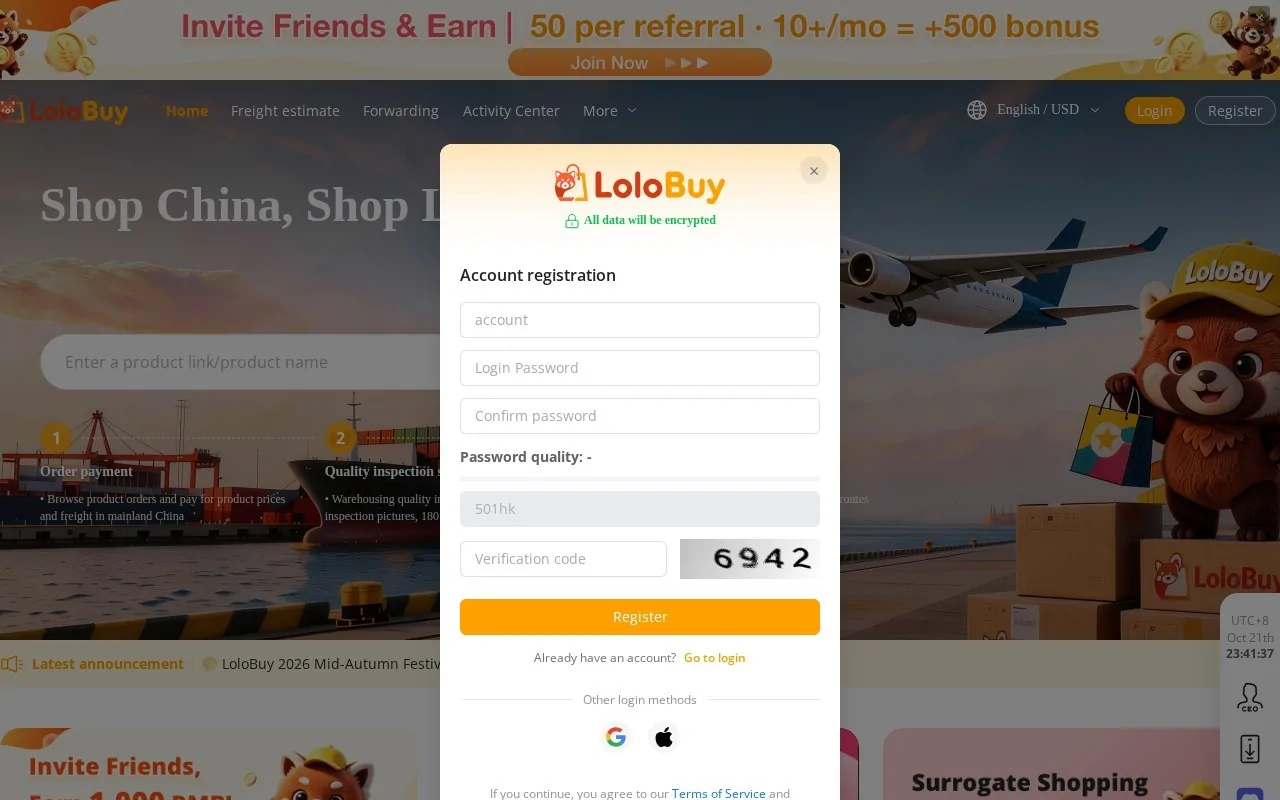
The registration pop-up on Lolobuy's home page, opened through an invite link, October 21, 2026. Paste the item link and read the product page
Every slip on this site has two links. "Listing photos" opens the catalogue entry; "Lolobuy order page" opens the same item already inside Lolobuy. If you find something on your own, copy its link from Taobao, Tmall, JD.com, Weidian or Yupoo and paste it into Lolobuy's search bar. Lolobuy says it can read the details of about 99 per cent of Taobao, Tmall and JD.com items; when it cannot, a "Fill in A Shopping Agent Order" form appears and you type the details yourself.
The product page shows the price in yuan with an estimate in your currency, the seller's name, the seller's freight to the Lolobuy warehouse and the option menu. In the screenshot below, a CNY 210 pair of trainers shows as about USD 33.47 and the warehouse freight as USD 1.59, which is CNY 10. Before Add to Cart or Buy Now becomes usable you tick a box confirming you have read Lolobuy's disclaimer about third-party sellers.
Read the option menu here, not on the catalogue: this is where the stock per size, the made-to-order sizes and the numbered colours show up.
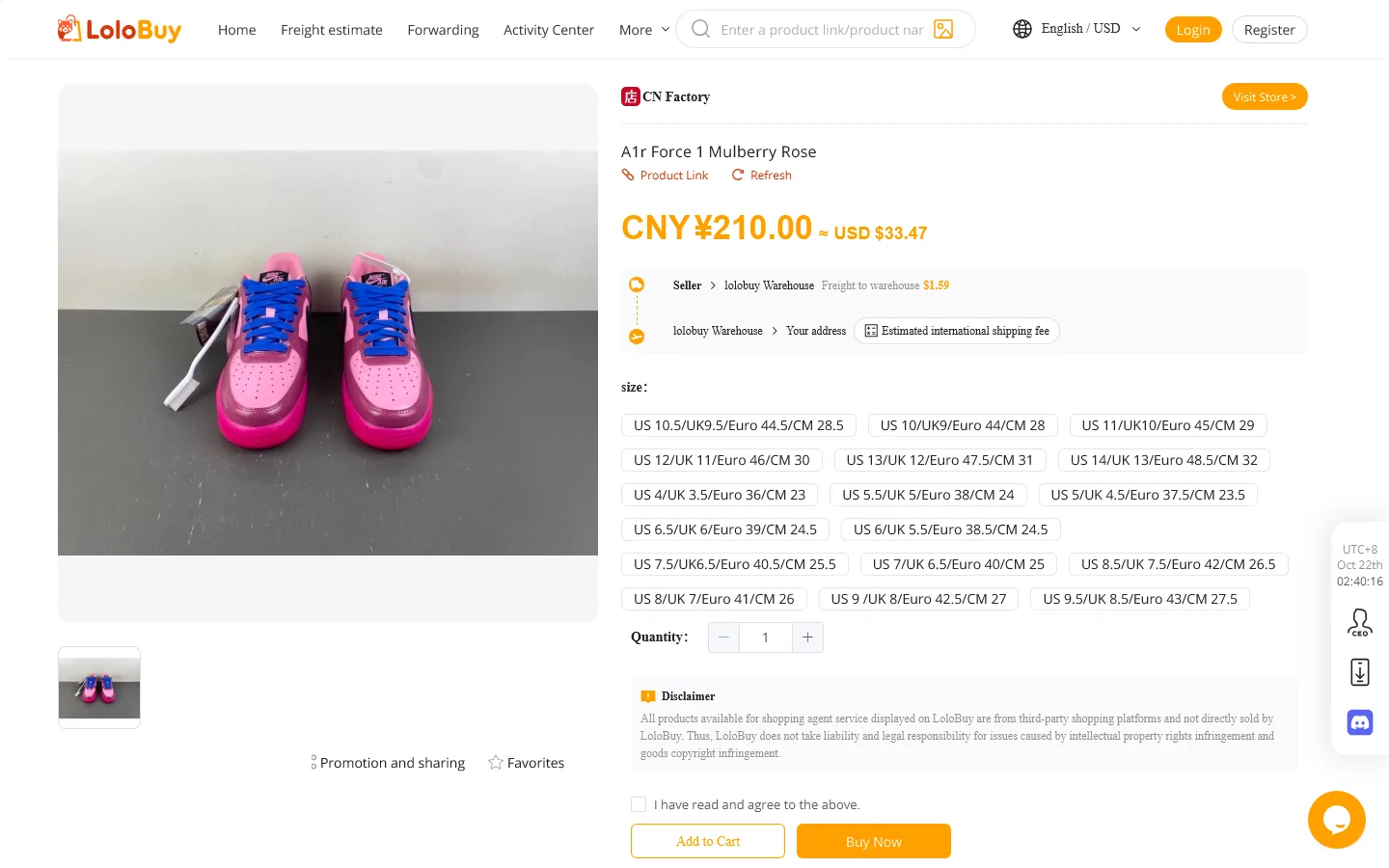
A pasted item link rendered by Lolobuy, logged out, October 22, 2026. This listing is not one of our slips; it shows the page layout. Options, a remark, then the first payment
Pick the size and colour, add the item to the cart or buy it directly, and pay for two things: the item and the seller's post to the warehouse. You also choose the destination country here and can add value-added services. Payment channels listed in Lolobuy's notices include PayPal, cards through Stripe, a CenturyPay card channel, MyBank for Italy, PIX for Brazil, and USDT or Bitcoin.
The remark box is where slips earn their keep. Lolobuy's help pages list the remark types it handles: no confirmation needed, refusing a seller's free gift, pre-order items, customised items, and "not sure about the size", where you give your height, weight and measurements and the purchasing agent checks the size with the seller. For numbered colours or model codes (slips 7, 15 and 20), write the number and the colour or design you expect.
Timing, by Lolobuy's own account: an order paid from 09:00 to 18:00 China time is dealt with inside 12 hours; one paid overnight is dealt with by 2 pm the following day.
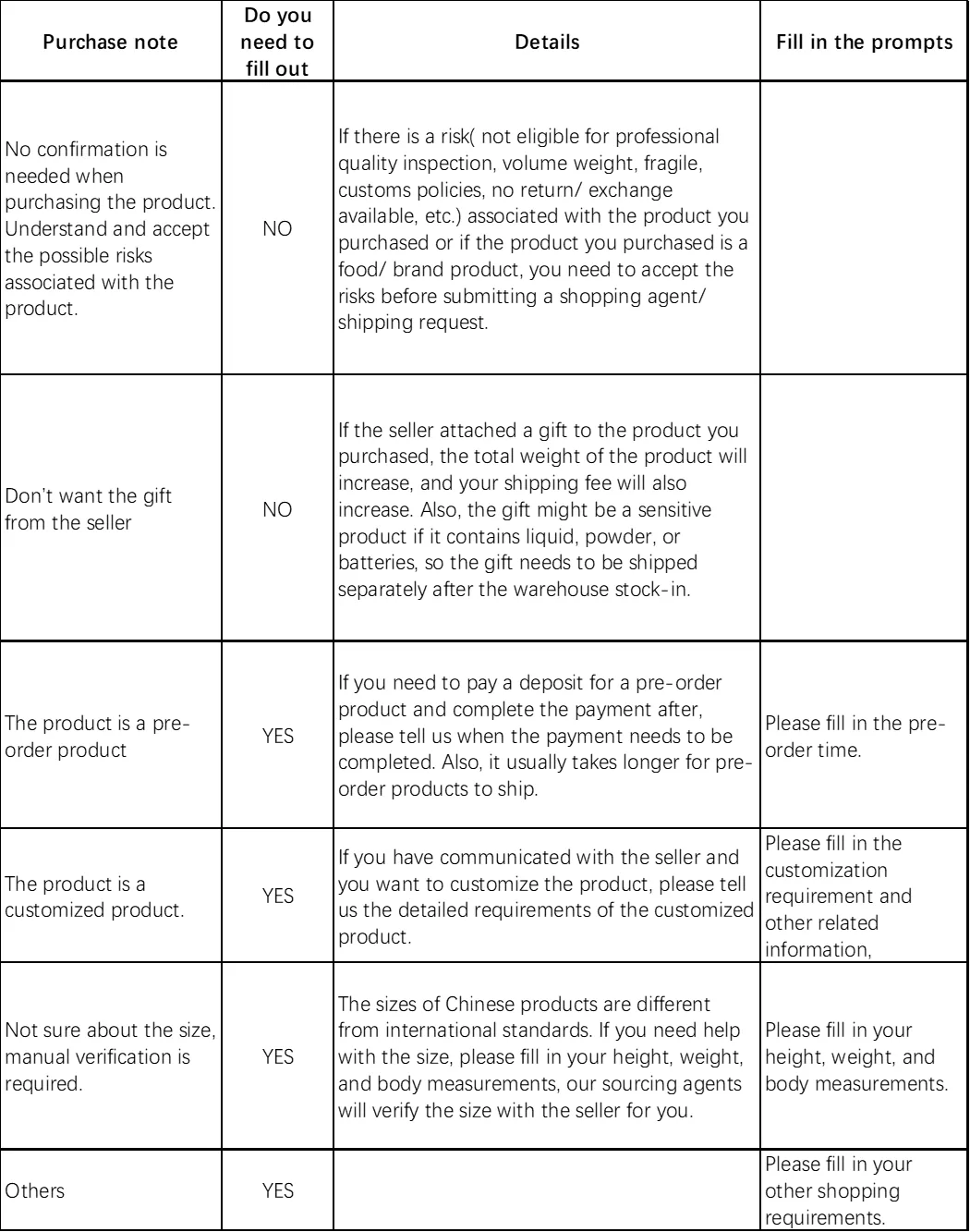
Purchase note options, from Lolobuy's help article on shopping warehouse remarks. Inspection photos arrive: approve, or ask for a return
The seller ships to Lolobuy's warehouse in Chengdu. Lolobuy's timing page says Taobao sellers usually dispatch within 3 to 7 days, and that parcels reaching the warehouse before 17:00 are inspected and stored within 24 hours. The order then shows as Stored and appears under My Warehouse with its photos.
How many photos you get depends on which Lolobuy page you read: "What is LoloBuy" promises five per item, the standard inspection article says 3 to 6. Either way, compare them with the slip's "QC photos to study" line. The inspection covers style, quantity, colour, size label, model and visible defects; Lolobuy's article gives a stain or hole wider than 0.5 cm, or a mark longer than 1 cm, as the kind of flaw it reports.
Act fast if something is wrong. Return and exchange requests must be made within 5 days of the Stored date; the storage clock works out the deadline.
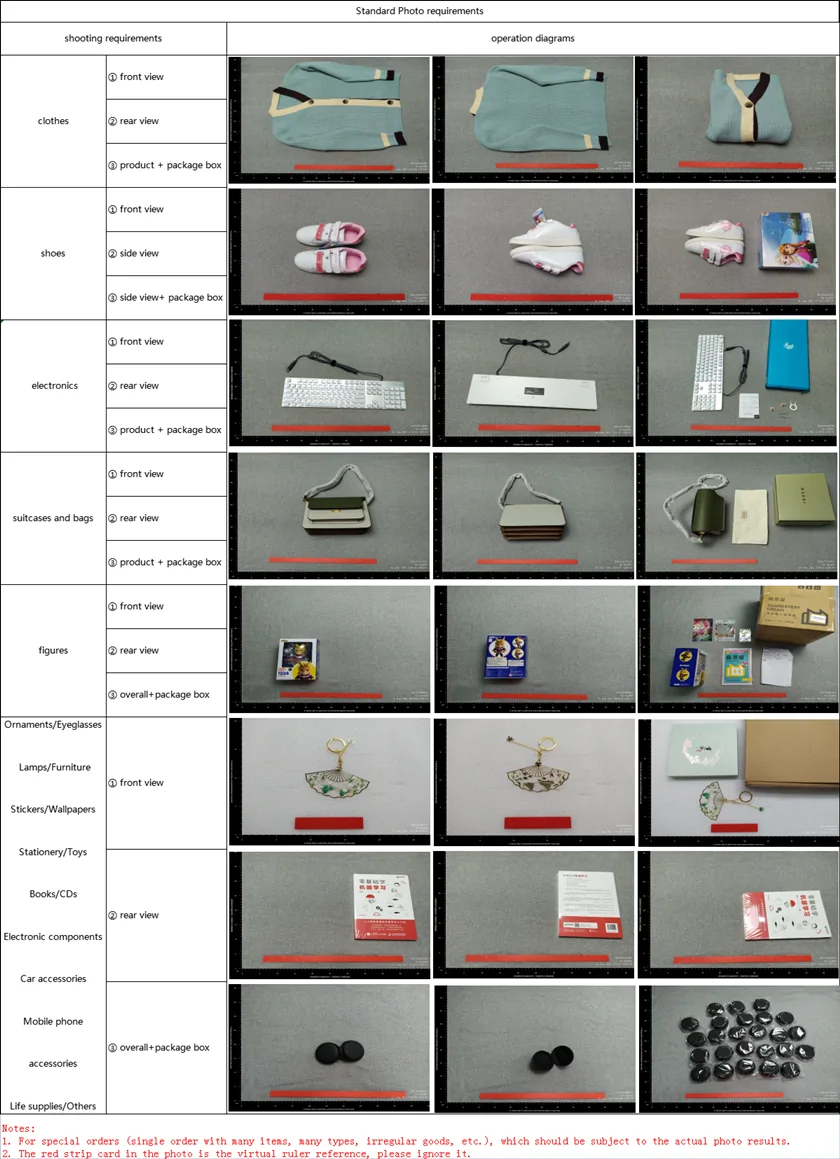
Lolobuy's standard photo examples by item type, from its Standard photo service help article. Bundle stored items into a parcel
When everything you want has reached Stored, open My Warehouse, tick the items and submit them as one parcel or several. Items can wait: storage is free for 180 days from the Stored date according to Lolobuy's storage article, then CNY 10 per item for each 30 days.
Packaging choices come up at this step. Minimalist and carton packing are free, as is package removal. Shoe boxes are removed by default since a July 14, 2026 notice; to keep one, leave a remark with the item number starting with LO. Items whose packaging has been removed can no longer be returned or exchanged.
Lolobuy also sells a parcel preview, so you can see the packed parcel before paying for shipping. Its launch notice priced it at CNY 20 a time with a promotional rate until September 15, 2026; check the current price on the parcel page.
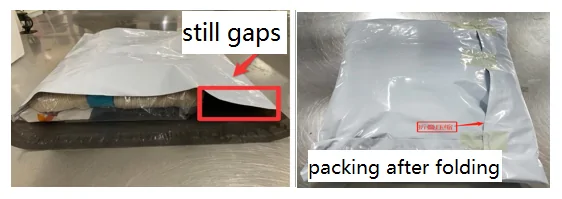
Packing with gaps, then folded tighter. From Lolobuy's help article on packaging methods. Line first, then the international postage
The parcel page lists the lines that accept your items and destination, with a price, a delivery window in working days and size limits. The same data powers Lolobuy's public estimator. On October 22 we ran it for a 1,000 g parcel to the United States: eight lines, from CNY 185 list price on two of them, with an automatic coupon taking 15 per cent off each line. Lolobuy's own short video on the estimator is on the shipping page.
You pay a deposit based on the estimated weight. After the parcel is weighed and sent, a lighter real weight is refunded to your balance within 3 working days if the difference reaches one continued weight unit, and a heavier one creates a supplementary payment.
ShipCare, Lolobuy's optional protection, costs 5 to 6 per cent of the goods value plus shipping and covers loss, damage, customs seizure and delay on eligible lines.
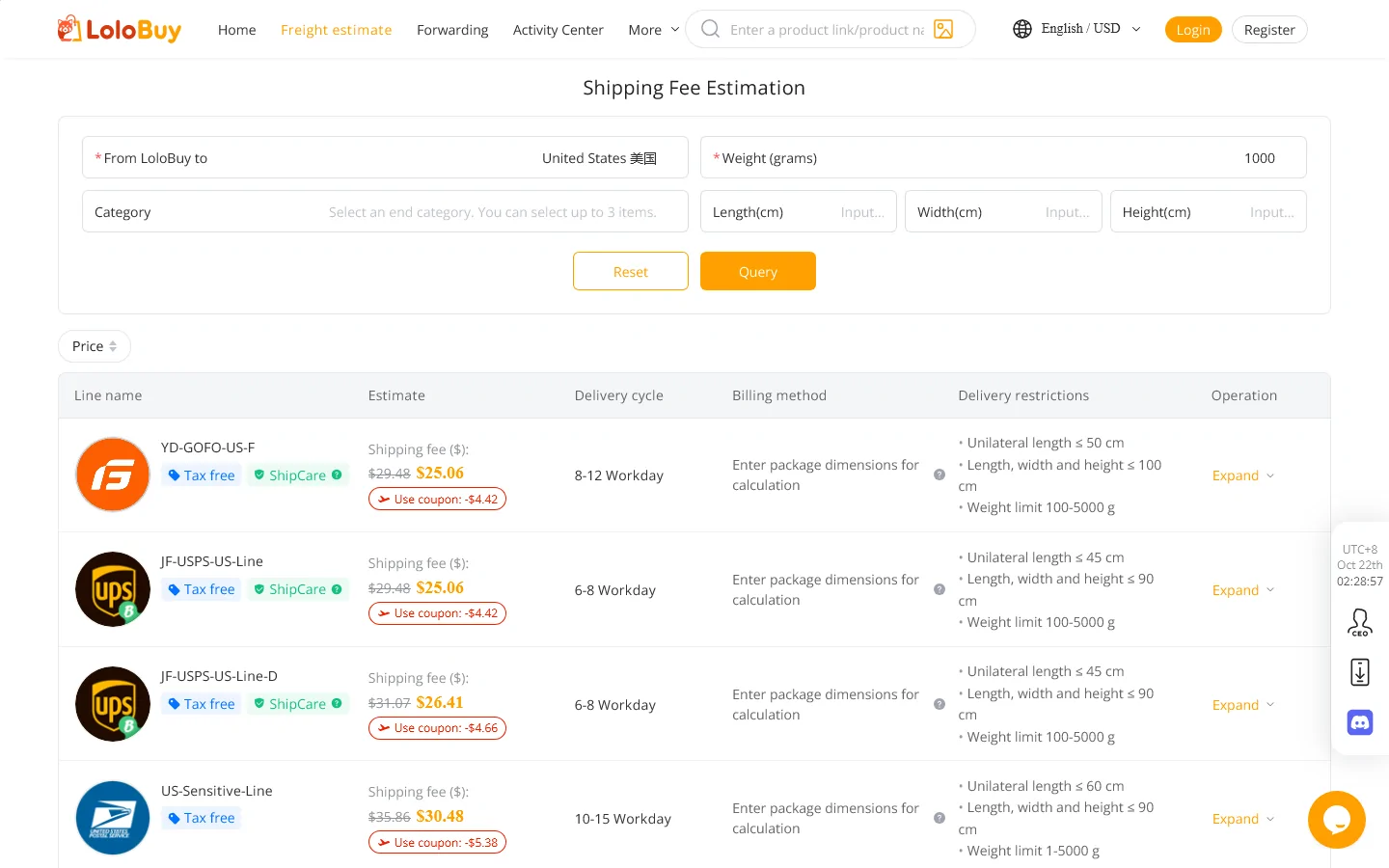
Lolobuy estimator, United States, 1,000 g, October 22, 2026. Prices shown in US dollars at Lolobuy's rate. Track it, sign for it, and use after-sales if needed
Once the parcel leaves, it is tracked under My LoloBuy, Parcels. On delivery, look the carton over before you cut the tape: seals, dents and how heavy it feels. Lolobuy's after-sales article asks for photos of both the parcel and the product when something is wrong, and promises a reply within 24 hours.
The time limits in that article do not agree with each other. It says to apply within 7 days of signing for the parcel or 45 days after it was shipped, then adds that applications more than 3 days after delivery may not be accepted. Treat 3 days as the safe limit.
Confirming delivery and leaving a review earns credit that Lolobuy says can be used against international shipping on a later parcel.
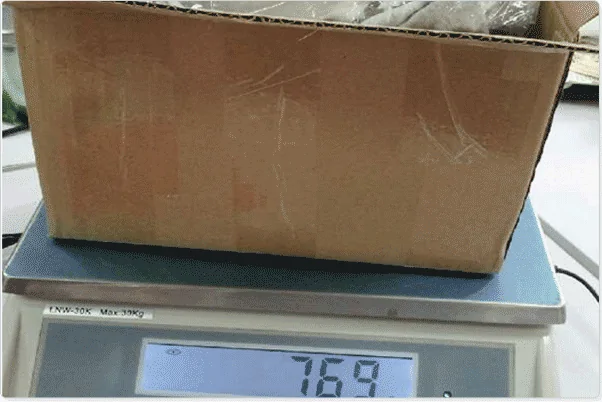
A parcel on the scale, from Lolobuy's help article on problems found after receiving goods.
Where each step is covered in more depth
Every step has a matching page on this site: QC photo checks for step 4, fit notes for step 3, shipping lines and costs for steps 5 and 6, and help and FAQ for step 7. Lolobuy's own version is its How to purchase on LoloBuy article.